
Safe Malware Simulation Lab Using PEStudio
Updated: Jul 29
Introduction
Static malware analysis is one of the first techniques used by security analysts when investigating a suspicious executable. Before a file is ever executed in a sandbox or virtual machine, analysts often inspect it to identify indicators that may suggest malicious behaviour.
In this project, I built a small malware simulation lab to practise static malware analysis using PEStudio. Rather than downloading or executing real malware, I created several harmless C++ applications designed to contain characteristics commonly found in suspicious executables, such as fake command strings, URLs and registry paths. This approach allowed me to safely explore how PEStudio analyses Portable Executable (PE) files while developing skills that are directly applicable to SOC and malware analysis roles.
Lab Objective
The objectives of this project were to:
Create several safe executables that resemble suspicious software.
Analyse each executable using PEStudio.
Identify suspicious strings, imports and indicators.
Document findings using screenshots and analyst notes.
Gain experience producing a professional malware analysis report.
Lab Environment
The analysis was carried out inside a Windows virtual machine to ensure the work was isolated from my host operating system.
Software Used
Windows 11 Virtual Machine
Microsoft Visual Studio Community 2022
PEStudio
PowerShell
Creating the Project Folder
To keep everything organised, I created the following folder structure:
C:\MalwareLab
│
├── samples
├── screenshots
├── reports
Figure 1 – MalwareLab project folder structure

Installing the Required Software
Installing Visual Studio
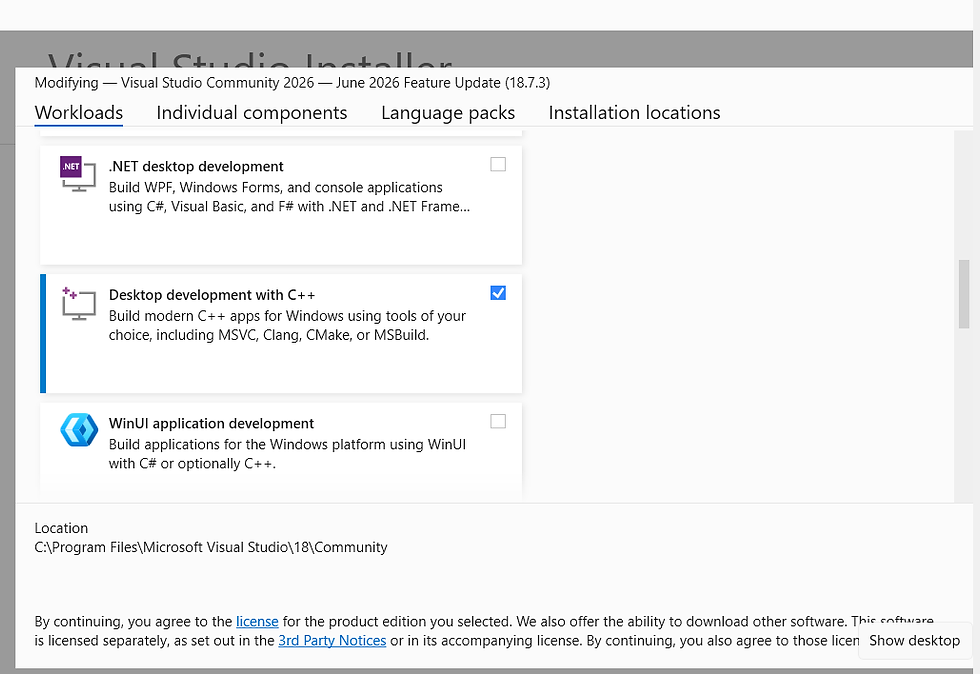
Visual Studio Community was installed with the Desktop Development with C++ workload selected.
This allows C++ console applications to be compiled into Windows executables for analysis.
Figure 2 – Visual Studio installer with Desktop Development with C++ selected
Installing PEStudio
PEStudio was downloaded, extracted and stored in:
C:\Tools\PEStudioSince PEStudio is portable, no installation was required.
Figure 3 – PEStudio extracted inside the Tools folder

Creating Sample 1 – Recon Application
The first application was designed to imitate software that performs basic system reconnaissance.
The application simply prints several strings to the console including:
Fake command-and-control URL
Encoded PowerShell command
Status messages
The application performs no malicious actions.
Figure 4 – ReconApp source code

After compiling the application in Release mode, the executable was copied into the Samples folder and renamed:
reconapp.exeFigure 5 – Recon application inside the Samples folder

Creating Sample 2 – Fake Update Loader
The second application was designed to imitate fake software update utilities commonly seen in phishing campaigns.
Its console output included messages such as:
Checking for updates
Downloading security patch
Installing update
Again, the executable performed no system modifications.
Figure 6 – Update Loader source code

After compiling, the executable was renamed:
UpdateLoader.exeFigure 7 – Renamed executable inside the Samples folder

Creating Sample 3 – Packed Sample
For comparison purposes, I also created an extremely small executable containing only an empty main function.
This sample provided a useful baseline when comparing PEStudio results with the other executables.
After compiling, the executable was renamed:
packed-sample.exeFigure 8 – Packed sample executable

Creating Sample 4 – IOC Demonstration
The final application was designed to contain numerous strings that analysts commonly search for during static analysis.
Examples included:
Fake IP addresses
Registry paths
Command Prompt commands
PowerShell execution strings
These strings exist only as text and are never executed.
The compiled executable was renamed:
ioc_bomb.exeFigure 9 – IOC sample inside the Samples folder

Static Analysis Using PEStudio
Each executable was analysed individually using PEStudio.
The analysis focused on several key areas:
File information
Indicators
Strings
Imports
Sections
Loading the Executable
The executable was opened by dragging it into PEStudio.
PEStudio immediately displayed metadata including:
Architecture
Compile timestamp
Hash values
File size
Figure 12 – recon_app.exe getting dragged into PEStudio

Strings Analysis
The Strings tab quickly identified several suspicious-looking values embedded within the executable.
Examples included:
Fake URLs
PowerShell command strings
File paths
Although these strings were harmless, they demonstrate the importance of inspecting embedded text during malware investigations.
Figure 13 – Strings tab displaying embedded strings

Indicators Analysis
The Indicators section highlights characteristics commonly associated with suspicious software.
PEStudio flagged various items for further investigation depending on the sample being analysed.
This provides analysts with an excellent starting point before performing deeper analysis.
Figure 14 – Indicators tab

Imports Analysis
The Imports tab lists Windows API functions referenced by the executable.
Reviewing imported functions helps analysts understand what capabilities an executable may possess.
In this project the imports reflected normal console application behaviour.
Sections Analysis
The Sections tab provides information about the executable layout including:
Section names
Entropy
Sizes
Permissions
Analysing section information is particularly useful when identifying packed or obfuscated executables.
Repeating the Analysis
The same workflow was repeated for:
windows_security_update.exe
packed_sample.exe
ioc_bomb.exe
This allowed direct comparison between multiple executables containing different characteristics.
Key Findings
Throughout the analysis several useful observations were made.
I then created some report notes stating the Risk level of each malware app

Recon Application
Embedded fake URL detected.
Clear demonstration of how PEStudio extracts strings.
Update Loader
Suspicious executable naming convention.
Minimal indicators.
Useful example of how social engineering often begins with file names rather than complex code.
Packed Sample
Served as a baseline comparison.
Minimal strings and indicators.
Demonstrated the differences between a simple executable and one containing suspicious artefacts.
IOC Sample
This executable generated the most interesting results.
Embedded strings included:
IP addresses
Registry paths
Command Prompt commands
PowerShell execution commands
PEStudio successfully highlighted many of these during analysis.
Lessons Learned
This project demonstrated how much information can be gathered without executing an executable.
Static analysis allows analysts to:
Identify suspicious strings.
Review imported Windows APIs.
Inspect executable structure.
Detect unusual metadata.
Build an initial assessment before progressing to dynamic analysis.
It also reinforced the importance of documenting every stage of an investigation using consistent screenshots and notes.
Conclusion
This project provided an excellent introduction to static malware analysis while remaining completely safe.
By creating my own harmless executables, I was able to explore how PEStudio analyses Windows Portable Executable files without relying on real malware samples.
The exercise also strengthened my documentation skills by producing structured evidence, annotated screenshots and repeatable analysis procedures.
As a future improvement, I plan to expand this lab by incorporating additional tools such as Process Monitor, Process Explorer and network analysis utilities to compare static analysis with behavioural observations in a controlled environment.
Final Thoughts
One of the biggest takeaways from this project is that effective malware analysis isn't just about finding malicious code—it's about following a structured investigation process. Even with harmless test executables, tools like PEStudio can reveal valuable information about file structure, embedded strings and potential indicators of interest.
Building this lab has given me greater confidence in performing static analysis and has provided a solid foundation for future malware research and SOC-focused projects.


Comments