
I Built a 24/7 AI Receptionist for a Local Plumbing Business Using Wix, Botpress and Microsoft Excel
A hands-on AI automation project from concept to working prototype
Project type: AI Automation / IT Project
Technologies: Wix, Botpress, Microsoft Forms, Microsoft Excel
Business: Viseu Rapid Plumbing — fictional demonstration business
Project duration: A few hours
Status: Working prototype
Introduction
AI is increasingly becoming part of everyday business operations, but I wanted to move beyond simply experimenting with ChatGPT or asking an AI tool to generate content.
I wanted to build something that could actually solve a business problem.
The idea was simple:
What if a local business could have an AI receptionist available on its website 24 hours a day, 7 days a week?
The AI could answer common questions, understand what a potential customer needed, collect important information and help turn website visitors into useful enquiries.
To test the concept, I created a fictional plumbing company called Viseu Rapid Plumbing.
The company is based in Viseu, Portugal, and the objective was to build a working proof of concept using free or readily accessible tools.
The final system uses:
Wix for the website
Botpress for the AI receptionist
Microsoft Forms for customer enquiries
Microsoft Excel for the lead database
The project wasn't intended to create a production-ready plumbing business. Instead, it was designed as a realistic demonstration of how AI could be integrated into a small business workflow.
The Business Problem
Imagine a customer discovers a plumbing problem at 10:30 PM.
They search online for a plumber and visit a company's website.
The company is closed.
There is no one available to answer the phone.
The customer leaves the website and contacts another business.
That's a potentially lost customer.
This is the problem I wanted to explore.
Instead of expecting a member of staff to be available 24/7, could an AI receptionist handle the initial interaction?
The AI wouldn't replace the plumber.
It wouldn't diagnose dangerous situations.
It wouldn't invent prices.
It wouldn't pretend to book appointments.
Instead, its job would be to handle the initial customer interaction and capture useful information for the human team.
Designing the System
Before building anything, I mapped out the basic workflow.
The concept was:
Customer → Wix Website → AI Receptionist → Lead Form → Excel
The AI would act as the first point of contact.

This screenshot shows the overall concept:
Customer
↓
Wix Website
↓
AI Receptionist
↓
Lead Form
↓
Excel
The objective was deliberately kept simple.
I wasn't trying to build an enormous enterprise AI platform.
I wanted to prove that a relatively small business could use accessible tools to create a useful automated customer journey.
Step 1 — Creating the AI Agent
The first major component was the AI receptionist.
I used Botpress to create the agent.
I named it: Viseu Rapid Plumbing AI Receptionist
The idea was to give the AI a clearly defined role rather than simply creating a generic chatbot.
The initial configuration focused on one objective:
Help customers with basic plumbing questions and capture qualified plumbing enquiries for the human team.
This distinction became important throughout the project.
I wasn't building an AI that was supposed to know everything.
I was building an AI with a specific business role.
Step 2 — Giving the AI Business Knowledge
One of the biggest problems with a generic chatbot is that it doesn't automatically know the specific information required by a business.
So I created a knowledge base for Viseu Rapid Plumbing.
The knowledge included:
Business location
Service area
Opening hours
Plumbing services
Pricing rules
Appointment rules
Emergency guidance
Customer information requirements


The AI was instructed to use this information when interacting with customers.
This gave the AI a defined source of business information.
The principle was simple:
Don't make the AI guess.
If the information wasn't available, the AI should tell the customer that the plumbing team would need to confirm it.
Step 3 — Controlling the AI's Behaviour
This was probably one of the most important parts of the project.
I created specific instructions for how the AI should behave.
For example, it was instructed:
Never invent prices.
Never pretend to be human.
Never claim an appointment is confirmed when it isn't.
Never claim that a plumber has been dispatched.
Don't guarantee an arrival time.
Ask relevant questions about the customer's problem.
Collect contact information.
Identify urgency.
Identify the customer's location.
Escalate dangerous situations appropriately.
This demonstrates an important concept when building business AI:
The AI needs boundaries.
A business wouldn't want an AI receptionist casually telling customers:
"A plumber will be there in 20 minutes."
if no plumber had actually been dispatched.
Likewise, it shouldn't invent:
"That repair will cost €80."
when the business hasn't provided that information.
The AI therefore acts as an information and lead-capture layer, rather than pretending to have capabilities it doesn't actually possess.
Step 4 — Testing the AI
Once the basic agent was configured, I started testing it.
I deliberately used realistic customer conversations rather than simply asking:
"What can you do?"
For example:
"I've got a leaking pipe."
The AI began asking questions about the problem.

I then continued the conversation by providing additional information.
The AI was able to continue the conversation and gather more context.

This was the first point where the project started feeling like an actual business application rather than an AI experiment.
Testing Pricing Questions
I specifically tested what would happen if a customer asked for a price.
For example:
"How much does it cost?"
The AI was instructed not to make up a price.

Instead of producing a fictional price, the AI explained that the plumbing team would need more information about the job.
This is exactly the sort of behaviour I wanted.
A convincing AI isn't necessarily one that answers every question.
Sometimes the correct answer is:
"I don't have that information, but the team can confirm it."
Testing Whether the AI Was Human
I also tested whether the AI would attempt to impersonate a person.
The customer asked:
"Are you a human?"
The AI correctly identified itself as an AI receptionist.

This is a small detail, but an important one.
Transparency matters when deploying AI into customer-facing environments.
Testing Emergency Situations
One of the more important tests involved a potentially dangerous situation.
I simulated a scenario involving water and electricity.
The AI was specifically instructed to prioritise safety rather than pretending that it could dispatch a plumber.

The purpose of these tests wasn't to make the AI an emergency service.
Quite the opposite.
The purpose was to ensure the AI understood its limitations and directed the customer toward appropriate safety actions.
This was one of the most important lessons from the project:
A business AI should know what it cannot do.
Step 5 — Building the Customer Website
With the AI working, I needed somewhere to put it.
I decided to use Wix for the website.
This was intentional.
Rather than building an entire website from scratch using code, I wanted to demonstrate that an AI receptionist could potentially be added to a standard small-business website.

I created a simple plumbing website rather than spending hours designing something complicated.
The homepage was focused on the business and its services.
The website included a straightforward call to action encouraging visitors to interact with the AI receptionist.

The Website Services
I created a services section covering areas such as:
Emergency plumbing
Leak repairs
Blocked drains
Blocked toilets
Bathroom plumbing
Kitchen plumbing
General plumbing

The goal wasn't to create a huge website.
The website existed primarily as the customer-facing front end of the AI system.
Step 6 — Creating the Enquiry Form
The AI can have a conversation with the customer, but eventually the business needs usable contact information.
For this part of the project, I created a Microsoft Form.
The form collects information such as:
Name
Phone number
Email
Location
Service required
Urgency
Preferred contact time
Description of the problem

This gives the customer a structured way of submitting their enquiry.
The AI can therefore act as the conversational front end while the form provides structured information for the business.
Step 7 — Creating the Excel Lead Database
The next part was creating the business's lead database.
I chose Microsoft Excel because it is a familiar tool for many businesses and demonstrates how the AI system could fit into an existing Microsoft-based environment.
I created an Excel workbook called:
Viseu Rapid Plumbing — AI Lead Database

The database contains fields including:
Field | Purpose |
Date | When the enquiry was received |
Name | Customer name |
Phone | Contact number |
Email address | |
Location | Customer location |
Service | Required service |
Problem | Description |
Urgency | Emergency/today/this week/etc. |
Preferred Contact | Phone/email |
Preferred Time | Customer preference |
Lead Score | Priority |
Status | Current lead stage |
AI Summary | Quick description |

This transforms the project from simply being a chatbot into something closer to a basic lead management system.
Step 8 — Building the Lead Workflow
The intended workflow became:
Customer interaction
↓
AI understands the enquiry
↓
Customer provides details
↓
Customer submits enquiry
↓
Lead information is recorded
↓
Business reviews the lead
The Excel database acts as the central location for the captured information.

Step 9 — Creating a Customer Contact Page
I also created a dedicated contact/enquiry area on the website.

The idea was to give customers two ways of interacting with the business:
AI receptionist
for conversational assistance,
and
Customer enquiry form
for structured submission.
Step 10 — Testing the Live Customer Experience
At this point, I moved away from testing the AI inside its development environment.
I wanted to test what an actual website visitor would experience.
The AI receptionist was available through the Viseu Rapid Plumbing website.

I then started interacting with it as if I were an actual customer.
Realistic Customer Scenario
I started with:
"Hi, I have a problem with my kitchen sink."
The AI recognised that the customer was describing a plumbing issue.
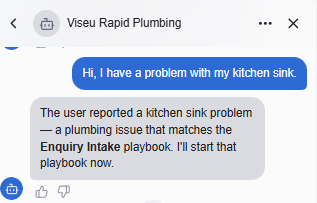
The AI then asked follow-up questions about the problem.

The conversation continued with additional information about the leak.
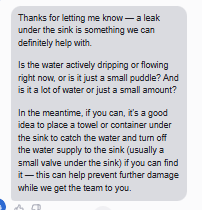
This demonstrated the conversational nature of the system.
The AI wasn't simply displaying a static FAQ.
It was responding to the information being provided by the customer.
Capturing the Customer Information
I then tested whether the AI could collect the customer's details.
The simulated customer provided:
Name: Harry Rock
Phone: 07997 237 627
Location: Rio de Loba
Issue: Active water leak underneath kitchen sink
Preferred time: As soon as possible

The AI was then able to summarise the information that had been provided.
This is useful because a business owner doesn't necessarily want to read an entire chatbot conversation just to understand what the customer needs.
A concise summary such as:
Customer has an active water leak underneath the kitchen sink and requires assistance as soon as possible.
is much more useful operationally.
Testing the AI's Limitations
I didn't want to test only scenarios where everything went perfectly.
A major part of the project was deliberately trying to push the AI outside its intended role.
For example, I asked it about situations where it couldn't guarantee a specific response time.

The AI correctly explained that it couldn't promise a specific response time.
This is another example of why controlled AI behaviour matters.
Testing Unrelated Questions
I also tested what would happen if a customer asked something unrelated to plumbing.
For example, I asked the AI about mathematics.

The objective here was to see whether the AI would simply answer anything it was asked or maintain its role as a plumbing receptionist.
Testing Out-of-Scope Requests
I also tested an unrelated delivery enquiry.

The AI maintained the scope of the business rather than pretending that Viseu Rapid Plumbing provided unrelated services.
Testing a High-Value Lead
One of the more interesting tests was a much larger potential project.
I simulated a customer saying that they were renovating a large house and wanted extensive plumbing work.

This is particularly interesting from a business perspective.
Not every enquiry has the same value.
A customer asking:
"How much does a tap repair cost?"
is potentially very different from:
"I'm renovating a five-bedroom house and need the plumbing replaced."
The second enquiry could represent a much larger potential project.
That led to the next part of the experiment: lead scoring.
Lead Scoring
I created a simple lead-priority system.
For example:
Emergency: 100
Needs help today: 75
This week: 50
Information only: 20
Additional points could then be added for things such as:
Complete contact information: +10
Within service area: +10
Large project: +15
The objective is not to pretend that the scoring system is a perfect measure of revenue.
It's simply a way of helping the business answer:
Which enquiries should I look at first?
The Excel Lead Dashboard
I also created a dashboard concept in Excel.

The dashboard is designed to give the business an immediate overview of incoming enquiries.
For example:
Total Leads
New Leads
Urgent Leads
Contacted
Booked
Completed
This could eventually be connected to automated workflows so that the figures update automatically.
For this prototype, the important thing was demonstrating the structure.
What I Learned From Building It
The biggest lesson from this project was that building an AI business solution is not really about the AI alone.
The chatbot is only one component.
The actual system is:
Website
AI
Business knowledge
Customer interaction
Lead capture
Data storage
Human follow-up
That's what makes the project useful.
A chatbot that answers questions but doesn't help the business capture or manage enquiries has limited commercial value.
AI Needs Boundaries
Another major lesson was the importance of defining what the AI shouldn't do.
I deliberately created rules preventing the receptionist from:
Making up prices
Claiming appointments are confirmed
Claiming plumbers have been dispatched
Guaranteeing arrival times
Pretending to be human
Inventing information
This is particularly important when AI is being introduced into real businesses.
The goal shouldn't be:
"Make the AI answer everything."
It should be:
"Make the AI reliably handle the tasks it's actually responsible for."
Why I Chose a Plumbing Business
I deliberately chose plumbing because it provides a good demonstration of the concept.
Plumbing enquiries can vary significantly.
Someone might have:
A simple question
A blocked toilet
A leaking tap
A serious leak
An emergency
A bathroom renovation
A large property project
That creates a useful range of scenarios for testing an AI receptionist.
The same architecture could potentially be adapted for other local service businesses.
For example:
Electricians
Builders
Roofers
Heating companies
Landscapers
Cleaning companies
Auto repair businesses
Property maintenance companies
The business information changes, but the underlying workflow can remain similar.
The Final Architecture
The final concept can be represented as:
CUSTOMER
    │
    ▼
WIX WEBSITE
    │
    ▼
AI RECEPTIONIST
(BOTPRESS)
    │
    ├── Answers questions
    │
    ├── Identifies customer needs
    │
    ├── Determines urgency
    │
    └── Collects information
            │
            ▼
     MICROSOFT FORMS
            │
            ▼
          EXCEL
       LEAD DATABASE
            │
            ▼
      BUSINESS OWNER
            │
            ▼
       HUMAN FOLLOW-UP
What the Prototype Can Demonstrate
The finished prototype demonstrates several concepts:
24/7 initial customer interaction
The AI can respond outside normal business hours.
Business-specific knowledge
The AI has information about the fictional business rather than operating as a completely generic chatbot.
Lead qualification
The AI can ask questions about the customer's problem.
Customer information collection
The system can capture useful information such as location, urgency and contact details.
Structured enquiries
Microsoft Forms provides a consistent enquiry format.
Lead management
Excel provides a familiar database for managing enquiries.
Lead prioritisation
A basic scoring system can help identify urgent or potentially valuable enquiries.
AI safety boundaries
The receptionist is instructed not to invent information or make promises that the business hasn't actually confirmed.
What I Would Build Next
This prototype is deliberately simple.
The next stage would be to automate the parts that currently require manual intervention.
For example:
Customer
↓
AI receptionist
↓
Automatically extract lead information
↓
Automatically create Excel record
↓
Automatically calculate lead score
↓
Automatically generate AI summary
↓
Automatically email business owner
↓
Dashboard updates
That would move the project from a working proof of concept toward a more complete business automation solution.
A future version could also potentially integrate:
CRM systems
Appointment booking
Voice AI
Automated follow-up
Review management
But I deliberately didn't add these features during the first build.
The objective was to prove the core concept first.
Final Thoughts
This project started with a relatively simple question:
Could a small local business use AI to respond to customer enquiries 24/7 without needing someone sitting behind a computer all night?
The answer from this prototype is:
Yes — at least from a proof-of-concept perspective.
The interesting part isn't that an AI can have a conversation.
We've known that for some time.
The interesting part is what happens when you connect that AI conversation to an actual business workflow.
In this project, that workflow became:
Website → AI → Customer Qualification → Lead Capture → Excel → Human Follow-Up
That is where I think AI becomes considerably more interesting for small businesses.
Rather than selling a business "an AI chatbot", the more useful proposition is:
An AI-powered system that helps you respond to, qualify and organise customer enquiries.
And that's ultimately what I set out to build with Viseu Rapid Plumbing.


Comments